Madden NFL 26 Tips: The Ultimate Settings Guide for Offense, Defense, Special Teams & More
Madden NFL 26 offers a wide range of customizable settings that can give you a competitive edge. By tweaking your offensive, defensive, and special teams settings, you can improve your passing accuracy, make better tackles, and ensure your star players stay on the field longer. This Ultimate Settings Guide will help you fine-tune your game for better performance and more wins.
If you’re still running Madden NFL 26 on default settings, you’re playing with one hand tied behind your back. The right tweaks can completely change how your team performs — from sharper passing and lockdown defense to more clutch special teams plays. I’ve broken down 16 must-change settings into four key categories — Offense, Defense, Special Teams, and Miscellaneous — so you can fine-tune your game plan and gain a real edge. Whether you’re grinding Ultimate Team, dominating Franchise Mode, or going head-to-head online, these tips will help you win more games and stay a step ahead of your opponents.
Offense:
1. Set Your Playbooks Before Playing: First thing’s first, you have to be comfortable with your game plan. In online head-to-head, you can lock in your offensive and defensive playbooks from the settings menu. Doing this prevents you from accidentally loading into a game with a playbook you haven’t mastered. It’s an easy but crucial step for any competitor playing Madden NFL 26. A great playbook can make all the difference, especially when you’re playing against other skilled players. This simple change allows you to focus on the game itself, not on learning a new scheme on the fly.
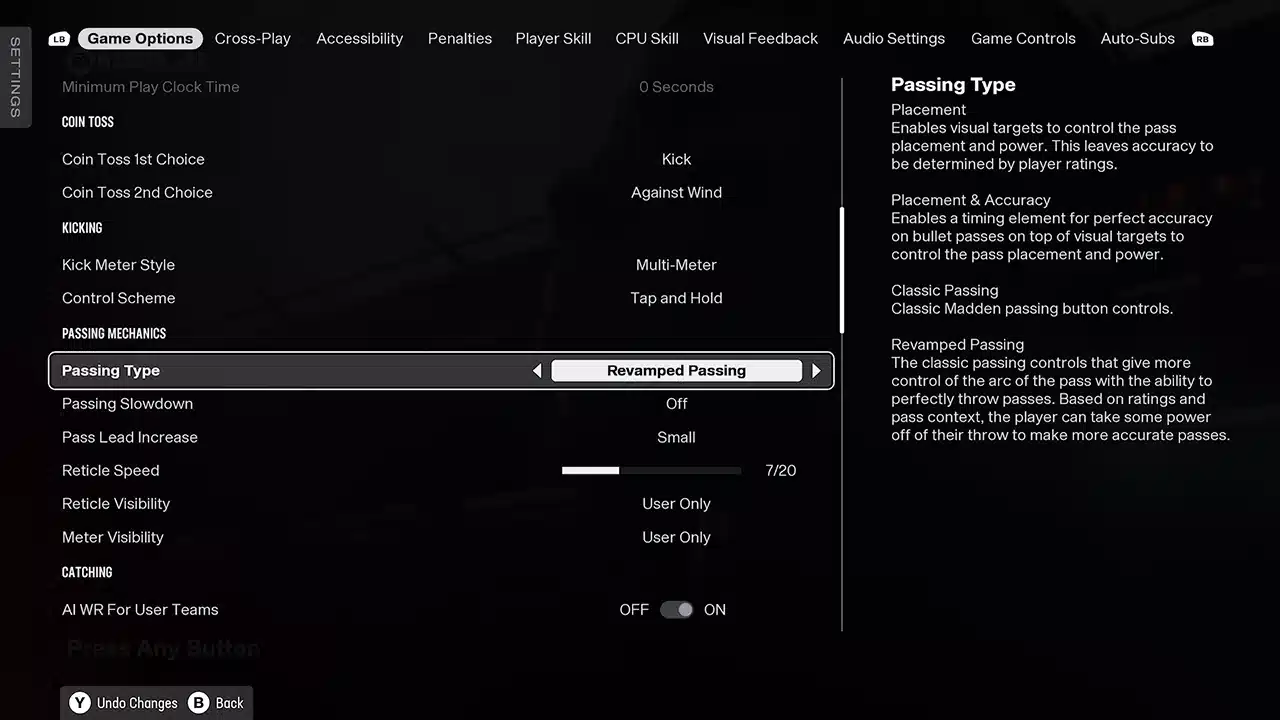
2. Revamp Passing: Now, let’s talk about throwing the ball. Look, if you’re a veteran player, you’re used to a certain feel, right? But with the Revamp Passing setting, you keep that classic feel while unlocking so much more control. See this here? It lets you drop the ball exactly where only your receiver can get it. After all, a perfect pass is the key to a strong offense in Madden NFL 26. You can put the ball on the back shoulder or throw a touch pass over a linebacker. This new level of precision is an absolute game-changer. Once you adjust to this system, you won’t ever want to go back to the default mechanics.
3. Wear and Tear Adjustments: This is a big one for your Franchise Mode players. You want your best players on the field, especially your franchise QB. To do that, lower your Wear & Tear setting to 40. This keeps your starters in the game longer and prevents them from getting gassed. To complement this, you’ll want to raise Recovery to 60, so they return faster when they do get hurt or fatigued. Making these adjustments is key to keeping your playmakers on the field for the entire game, which is critical to winning. This is a game-changing tweak that will impact every drive.
Defense:
4. Turn Off Auto Flip Defense: Look, you want to be in control of your defense, not let the AI do it for you. Disabling Auto Flip Defensive Play Call lets you control your blitz setups and coverage adjustments. By turning this off, you can set up your defense exactly how you want it, without the game flipping plays unexpectedly. This is especially important for blitz schemes and getting the right players in the right spots. You’ll find that turning this off gives you a much better feel for the game and helps with the `Madden NFL 26` defensive scheme you want to run.
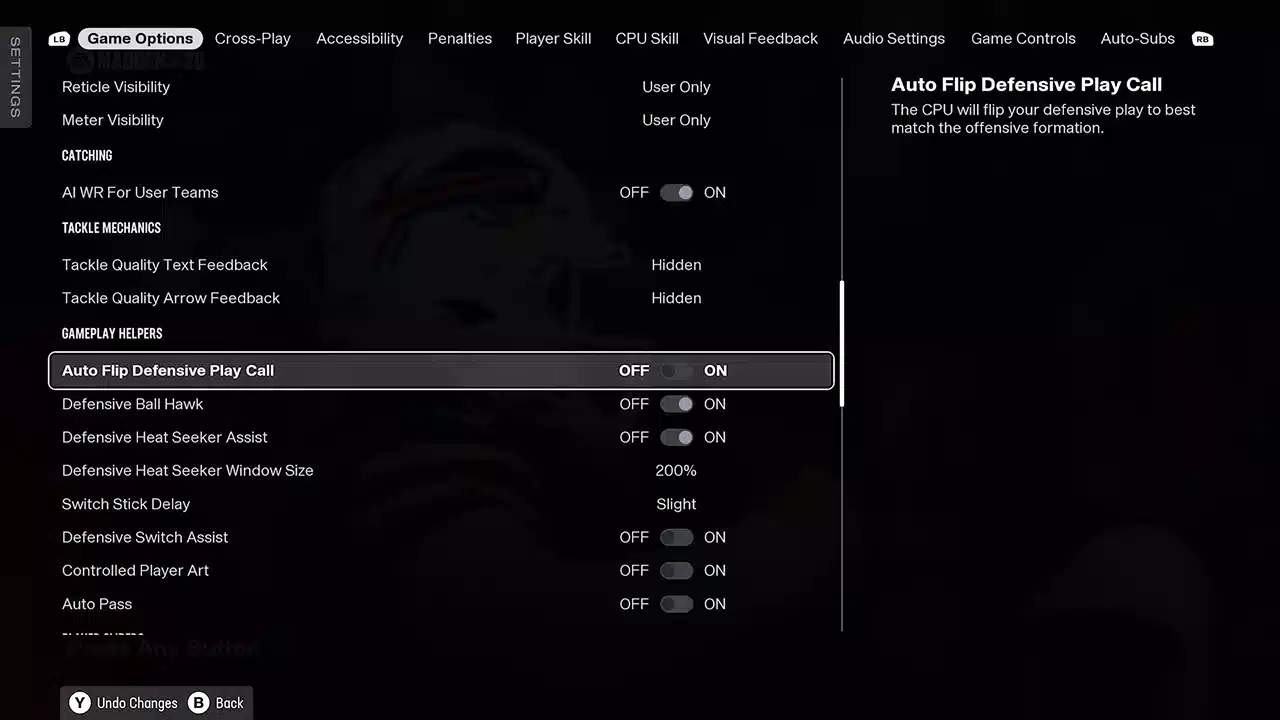
5. Turn On Defensive Ball Hawk: This one is a no-brainer. There’s really no reason to ever have this off. Turning on Defensive Ball Hawk helps your defenders automatically position themselves for interceptions, making them more reactive to errant passes. Your DBs will have a better chance to make a play on the ball. This is a simple but effective tweak that can lead to more turnovers and a lockdown defense.
6. Heat Seeker Assist to 200%: If you want to make more tackles, you need to crank your Heat Seeker Assist Window to 200%. This setting acts as a “magnet” for your defender, pulling them toward the ball carrier. This gives you a bigger window to get to the ball carrier and make a play. While it may not look pretty, it’s a huge help for making clutch stops and preventing big runs. Making this adjustment will improve your overall defensive play in `Madden NFL 26`.
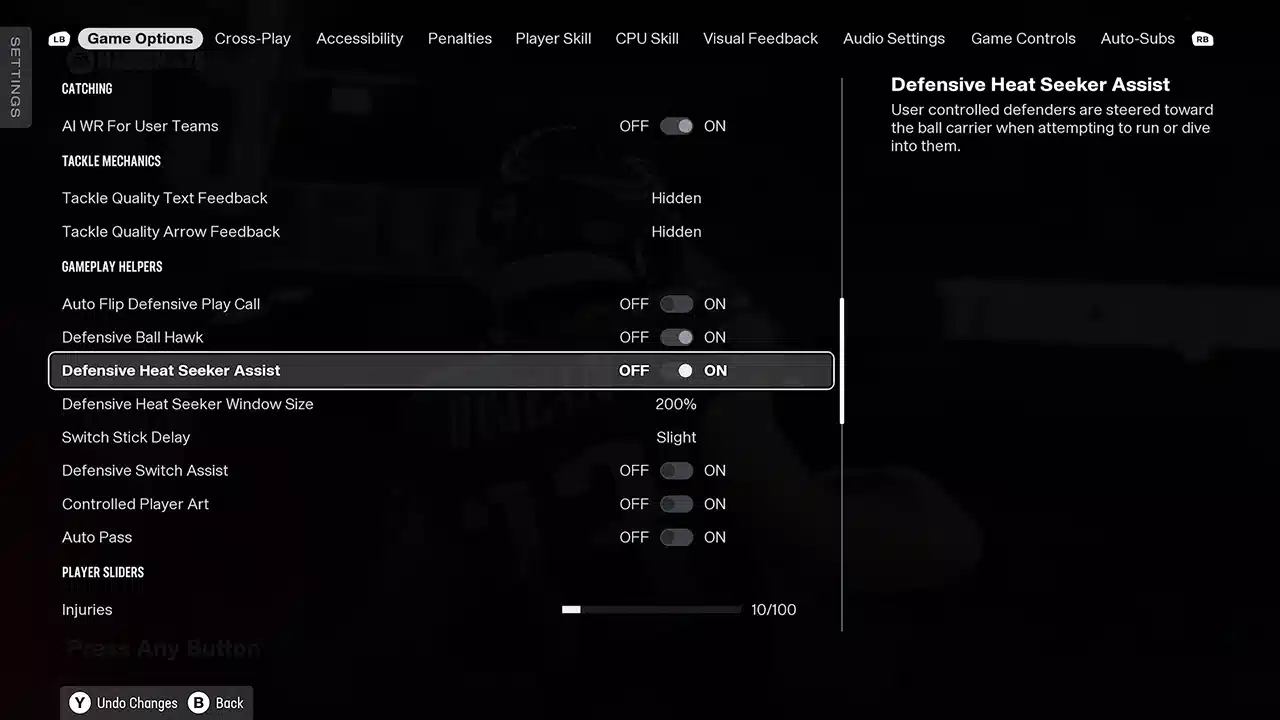
7. Switch Stick Delay: Off: For me, this is just a preference, but it’s one that I think makes a difference. I’m not a big fan of this setting, so I just turn it off. If you do like it on, set it to Slight. It will prevent those last-second pre-snap adjustments from switching you to random players when the ball is snapped. This helps you stay in control of the player you want to use and avoid defensive mixups.
8. Coaching Adjustments: Defensive Motion Response: Here’s a pro tip: disable Defensive Motion Response. This setting will prevent motioning WRs from messing up your blitz alignments. The last thing you want is a perfectly timed blitz to fall apart because a receiver motions across the field. With this off, your blitzes will stay true and your defensive scheme will remain intact. This allows for a much more consistent and effective defense.
9. RPO & Option Read Keys: When facing an RPO or option, you need to force the play back inside. Set your Option Read Key to Conservative (focus QB) and your Pitch Key to Aggressive (hit RB pitch early). For RPOs, set the RPO Read Key to Conservative (focus QB) and the RPO Pass Key to Conservative (focus pass). These adjustments will help you defend against the modern NFL offense. These settings are crucial when playing a skilled opponent who loves to run the option. This is something that could also apply to EA Sports College Football 26.
10. Safety Depth: Bringing your safeties closer to the line is a must, especially in a Cover 4. It gets them into passing lanes faster and helps in run support. With this setting, your safeties are more likely to make a play on a deep pass or come down to help stop the run. It makes your defense much more versatile and prepared for any offensive attack, which is essential in Madden NFL 26. Might even consider it for Cover 2 coverage as well.
Special Teams:
11. Coin Toss Settings: This is an easy way to get a competitive edge. Your First Choice should always be to Kick, so you get the ball in the 2nd half. Your Second Choice should be Against Wind, which gives you the wind advantage in clutch late-game kicks. You will be in a much better position to win if you get the ball at the start of the second half. This simple choice can be the difference between a win and a loss.
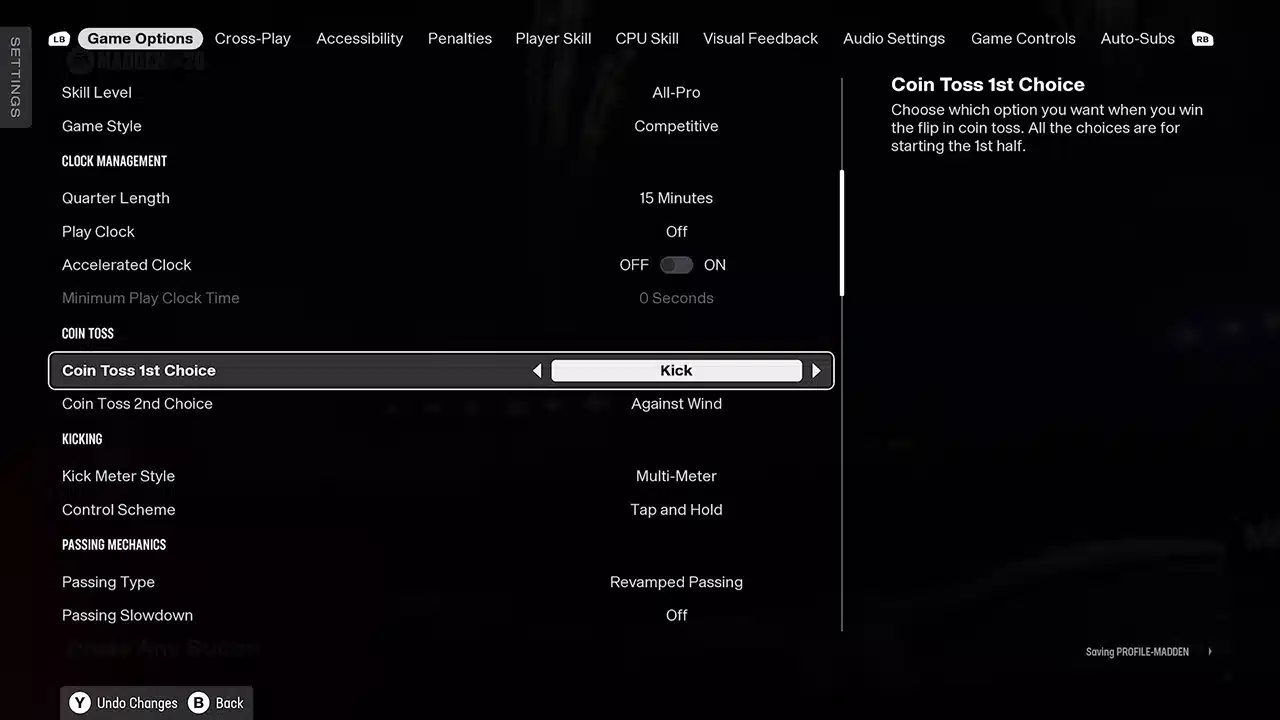
12. Kick Meter: Multi-Meter: If you play competitively, you have no choice but to get used to the multi-meter. It’s required in competitive modes. The multi-meter gives you more control and accuracy over your kicks, but it requires practice. With this setting, you can consistently hit perfect kicks and make those clutch field goals at the end of the game. It is a vital skill to have, and it will give you a competitive edge. It’s also a good tip for EA Sports College Football 26.
Miscellaneous:
13. New Auto Sub System (Offense & Defense): You need to manage fatigue and keep your best players on the field. Here’s a breakdown:
- Quarterback: Grind it out (never sub).
- Running Back: Keep it fresh if you have a committee unless you have a bell cow such as Saquon Barkley — then I would set to grind it out.
- Receivers & O-Line: Grind it out.
- Linebackers/D-Line: Depends on depth; stars should grind it out.
- Cornerbacks: Grind it out.
- Safeties: Grind it out.
These settings will keep your stars on the field and help you win games. This is something that you should have on in every game mode, especially in Ultimate Team.
14. Crossplay Off (If Needed): If you’re having connection issues, disable crossplay from your console settings. Be careful — toggling this in-game can sometimes cause glitches. If you’re noticing that your connection is lagging, then this is the first thing you should try. By turning this off, you will only play against people on your platform, which could improve your connection. This is a vital tip for online head-to-head.
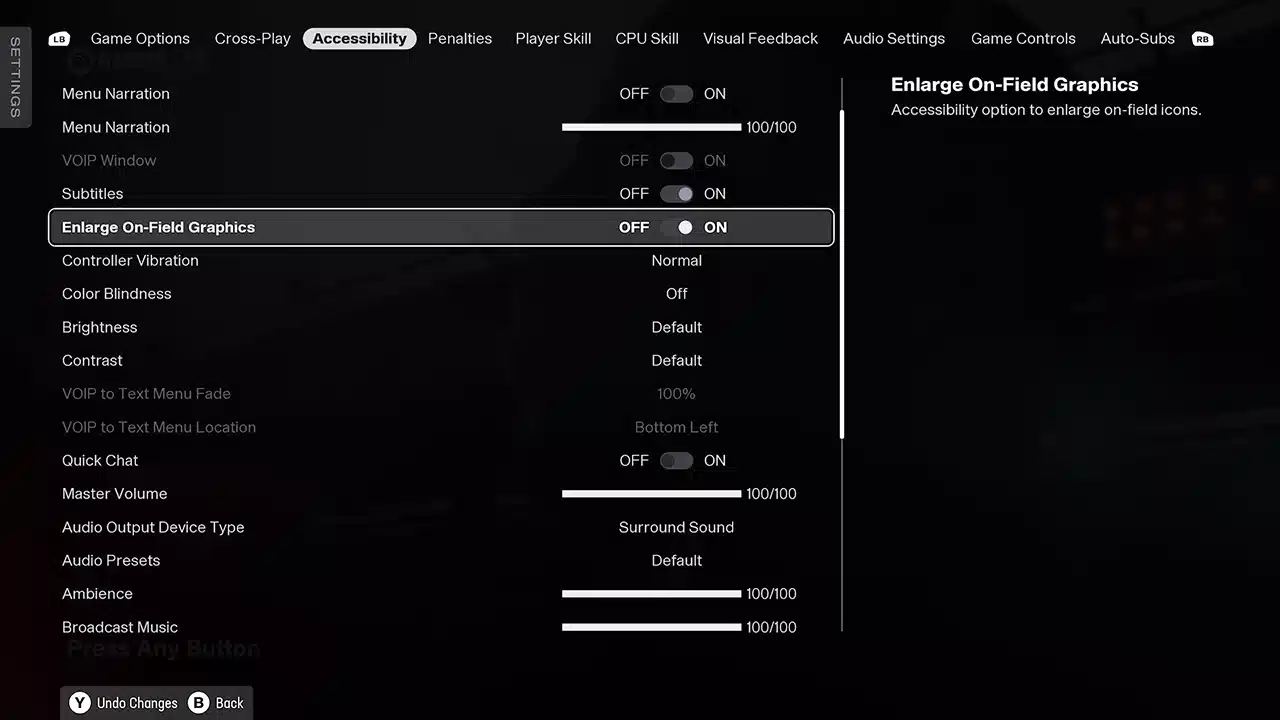
15. Enlarged On-Field Graphics: In Accessibility settings, you can enlarge on-field icons for better visibility in bad weather or night games. This will help you read the game and make better decisions. This is an excellent tip for anyone who has trouble seeing the play art. This is a game-changing adjustment that can help you win more games. This is a small change that makes a huge difference in Madden NFL 26.
16. Save & Adjust In-Game: Remember that you can tweak these coaching adjustments and subs mid-game if you switch teams or need to adapt to your opponent’s play style. Don’t be afraid to make changes and adapt your strategy. The best players in the world are always making adjustments, and you should too. Be sure to use this to your advantage to win more games and get that championship.
There you have it. A comprehensive look at the must-change settings to take your Madden NFL 26 game to the next level. By making these adjustments, you are setting yourself up for success on both sides of the ball and on special teams. You’re giving yourself the best chance to win, plain and simple. Now get out there and go dominate.
Go dominate the competition with these ultimate settings!